
티스토리 뷰
Set 객체는 중복되지 않는 유일한 값들의 집합이다.
배열과 유사하지만 값을 중복하여 사용할 수 없고 순서에 의미가 없으며 인덱스로 접근이 불가능하다.
set을 사용하면 교집합, 합집합등 수학적 특성을 이용할 수 있다.
const set1 = new Set([1, 2, 3, 3]);
console.log(set1); // Set(3) {1, 2, 3}

const set2 = new Set('hello');
console.log(set2); // Set(4) {"h", "e", "l", "o"}
요소의 개수 확인은 Set.prototype.size프로퍼티를 사용하여 얻을 수 있다.
const set = new Set([1, 2, 3]);

console.log(Object.getOwnPropertyDescriptor(Set.prototype, 'size'));
// {set: undefined, enumerable: false, configurable: true, get: ƒ}

set.size = 10; // 무시된다.
console.log(set.size); // 3
요소의 추가는 Set.Prototype.add메서드를 사용한다.
add후에 새롭게 추가된 set객체를 반환하기 때문에 연속적으로 호출할 수 있다.
중복된 요소의 추가일 경우 add가 무시된다.
const set = new Set();

set.add(1).add(2).add(2);
console.log(set); // Set(2) {1, 2}
set객체는 JS의 모든 값을 요소로 저장할 수 있다.
const set = new Set();

set
  .add(1)
  .add('a')
  .add(true)
  .add(undefined)
  .add(null)
  .add({})
  .add([]);

console.log(set); // Set(7) {1, "a", true, undefined, null, {}, []}
Set객체에 특정 요소가 존재하는지 확인하기 위해선 Set.prototype.has메서드를 사용한다. boolean으로 반환을 한다.
const set = new Set([1, 2, 3]);

console.log(set.has(2)); // true
console.log(set.has(4)); // false
요소의 삭제는 Set.prototype.delete메서드를 사용하고 삭제하려는 값을 인덱스가 아닌 값 자체로 전달해야한다.
삭제여부를 boolean으로 반환한다. 존재하지 않는 값을 삭제하려하면 그냥 무시된다.
const set = new Set([1, 2, 3]);

// 요소 2를 삭제한다.
set.delete(2);
console.log(set); // Set(2) {1, 3}

// 요소 1을 삭제한다.
set.delete(1);
console.log(set); // Set(1) {3}
요소의 값을 모두 삭제하기 위해서 Set.protorype.clear메서드를 사용한다. 언제나 undefined를 반환한다.
const set = new Set([1, 2, 3]);

// 존재하지 않는 요소 0을 삭제하면 에러없이 무시된다.
set.delete(0);
console.log(set); // Set(3) {1, 2, 3}
Set의 요소를 순회하기 위해선 Set.prototype.forEach를 사용한다.Array의 forEach와 유사하게 콜백함수와 메서드의 콜백함수 내부에서 this로 인수를 전달한다. forEach(순회중인 요소값,순회중인 요소값, Set객체 자체)를 인수로 받는다.
const set = new Set([1, 2, 3]);

set.forEach((v, v2, set) => console.log(v, v2, set));
/*
1 1 Set(3) {1, 2, 3}
2 2 Set(3) {1, 2, 3}
3 3 Set(3) {1, 2, 3}
*/
Set은 iterable 이기 때문에 for문으로도 순회가 가능하다.
const set = new Set([1, 2, 3]);

// Set 객체는 Set.prototype의 Symbol.iterator 메서드를 상속받는 이터러블이다.
console.log(Symbol.iterator in set); // true

// 이터러블인 Set 객체는 for...of 문으로 순회할 수 있다.
for (const value of set) {
  console.log(value); // 1 2 3
}

// 이터러블인 Set 객체는 스프레드 문법의 대상이 될 수 있다.
console.log([...set]); // [1, 2, 3]

// 이터러블인 Set 객체는 배열 디스트럭처링 할당의 대상이 될 수 있다.
const [a, ...rest] = [...set];
console.log(a, rest); // 1, [2, 3]
Set은 수학적 집합을 구하기 위한 자료구조이므로 교집합,합집합,차집합등을 구현할 수 있다.
1.교집합, 2가지 방법이 있다.
//첫번째 방법
Set.prototype.intersection=function (set){
    const result=new Set();

    for (const value of set){
        if (this.has(value)) result.add(value);
    }
    return result;
}
//두번째 방법
Set.prototype.intersection = function (set) {
    return new Set([...this].filter(v => set.has(v)));
};

const set1=new Set([1,2,3,4]);
const set2=new Set([2,3,5]);

console.log(set1.intersection(set2));
2. 합집합, 2가지 방법이 있다.
//첫번째 방법
Set.prototype.union=function (set){
    const result=new Set();

    for (const value of set){
        result.add(value)
    }
    return result;
}
//두번째 방법
Set.prototype.union = function (set) {
    return new Set([...this,...set]);
};

const set1=new Set([1,2,3,4]);
const set2=new Set([2,3,5]);

console.log(set1.union(set2));
3.차집합, 2가지 방법이 존재
//첫번째 방법
Set.prototype.difference=function (set){
    const result=new Set();

    for (const value of set){
        result.delete(value)
    }
    return result;
}
//두번째 방법
Set.prototype.difference = function (set) {
    return new Set([...this].filter(v=>!set.has(v)));
};

const set1=new Set([1,2,3,4]);
const set2=new Set([2,3,5]);

console.log(set1.difference(set2));
4. 부분집합 확인, 2가지방법
//첫번째 방법
Set.prototype.isSuperset=function (subset){
    const result=new Set();

    for (const value of subset){
        if(!this.has(value)) return false;
    }
    return true;
}
//두번째 방법
Set.prototype.isSuperset = function (subset) {
    const supersetArr=[...this];
    return [...subset].every(v=>supersetArr.includes(v));
};

const set1=new Set([1,2,3,4]);
const set2=new Set([2,3,4,5]);

console.log(set1.isSuperset(set2));
Map객체는 key와 value의 쌍으로 이루어진 컬렉션이다. 객체와 유사하지만 차이가 있다.
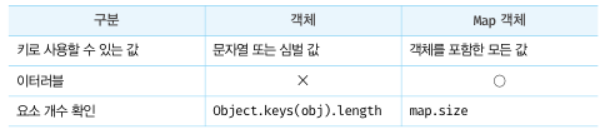
Map객체는 생성자로 생성한다. 인수를 전달하지 않으면 빈객체가 생성된다.
const map = new Map();
console.log(map); // Map(0) {}
중복된 키를 갖는 요소가 존재하면 값을 덮어씌우기 때문에 중복된 키를 갖는 요소가 존재할 수 없다.
const map = new Map([['key1', 'value1'], ['key1', 'value2']]);
console.log(map); // Map(1) {"key1" => "value2"}
개수의 확인은 Map.prototype.size를 사용한다.
size프로퍼티는 getter함수만 존재하기 때문에 수를 할당할 수 없다.
const map = new Map([['key1', 'value1'], ['key2', 'value2']]);

console.log(Object.getOwnPropertyDescriptor(Map.prototype, 'size'));
// {set: undefined, enumerable: false, configurable: true, get: ƒ}

map.size = 10; // 무시된다.
console.log(map.size); // 2
요소추가는 Map.prototype.set을 사용한다.
새루운 요소가 추가될 때 마다 Map객체를 반환한다.
const map = new Map();

map
  .set('key1', 'value1')
  .set('key2', 'value2');

console.log(map); // Map(2) {"key1" => "value1", "key2" => "value2"}
특정 요소를 가져오기 위해선 Map.prototype.get을 사용한다. 인수로 키를 전달하면 키가 갖는 value를 반환한다.
const map = new Map();

const lee = { name: 'Lee' };
const kim = { name: 'Kim' };

map
  .set(lee, 'developer')
  .set(kim, 'designer');

console.log(map.get(lee)); // developer
console.log(map.get('key')); // undefined
요소가 객체안에 존재하는지 확인하기 위해서 Map.prototype.has메서드를 사용한다. boolean값을 반환한다.
const lee = { name: 'Lee' };
const kim = { name: 'Kim' };

const map = new Map([[lee, 'developer'], [kim, 'designer']]);

console.log(map.has(lee)); // true
console.log(map.has('key')); // false
요소를 삭제하기 위해서는 set와 같이 Map.prototype.delete를 사용한다.
const map = new Map([['key1', 'value1']]);

// 존재하지 않는 키 'key2'로 요소를 삭제하려 하면 에러없이 무시된다.
map.delete('key2');
console.log(map); // Map(1) {"key1" => "value1"}
일괄적으로 전체를 삭제하기 위해서는 Map.prototype.clear를 사용한다.
const lee = { name: 'Lee' };
const kim = { name: 'Kim' };

const map = new Map([[lee, 'developer'], [kim, 'designer']]);

map.clear();
console.log(map); // Map(0) {}
map을 순회하기 위해서 Map.prototype.forEach메서드를 사용한다.
forEach(순회중인 요소값, 순회중인 요소키, Map객체 자체)를 인수로 전달받는다.
map도 itereble이기 때문에 for등과 스프레드 문법등으로 할당될 수 있다.
const lee = { name: 'Lee' };
const kim = { name: 'Kim' };

const map = new Map([[lee, 'developer'], [kim, 'designer']]);

map.forEach((v, k, map) => console.log(v, k, map));
/*
developer {name: "Lee"} Map(2) {
  {name: "Lee"} => "developer",
  {name: "Kim"} => "designer"
}
designer {name: "Kim"} Map(2) {
  {name: "Lee"} => "developer",
  {name: "Kim"} => "designer"
}
const lee = { name: 'Lee' };
const kim = { name: 'Kim' };
const map = new Map([[lee, 'developer'], [kim, 'designer']]);
// Map 객체는 Map.prototype의 Symbol.iterator 메서드를 상속받는 이터러블이다.
console.log(Symbol.iterator in map); // true
// 이터러블인 Map 객체는 for...of 문으로 순회할 수 있다.
for (const entry of map) {
console.log(entry); // [{name: "Lee"}, "developer"] [{name: "Kim"}, "designer"]
}
// 이터러블인 Map 객체는 스프레드 문법의 대상이 될 수 있다.
console.log([...map]);
// [[{name: "Lee"}, "developer"], [{name: "Kim"}, "designer"]]
// 이터러블인 Map 객체는 배열 디스트럭처링 할당의 대상이 될 수 있다.
const [a, b] = map;
console.log(a, b); // [{name: "Lee"}, "developer"] [{name: "Kim"}, "designer"]'스터디 자료' 카테고리의 다른 글
| [JavaScript] 타이머 (0) | 2022.12.06 |
|---|---|
| 브라우저의 렌더링 과정 (0) | 2022.11.18 |
| 26장. ES6 함수의 추가 기능 (0) | 2022.11.01 |
| 24장 클로저 (0) | 2022.10.25 |
| 12장 함수 (0) | 2022.10.10 |
- Total
- Today
- Yesterday
- 옵셔널체이닝연산자
- DOM
- defer
- delete
- TypeScript
- 자바스크립트
- Get
- 렌더트리
- MAP
- yarn berry
- async
- 심볼
- JS
- 호이스팅
- Front-End
- 공부
- yarn 4
- set
- http
- Vite
- html #css #코딩 #공부
- forEach
- node
- CSSOM
- 1일차
- JavaScript
- 단축평가
- 타입변환
- React
| 일 | 월 | 화 | 수 | 목 | 금 | 토 |
|---|---|---|---|---|---|---|
| 1 | 2 | 3 | ||||
| 4 | 5 | 6 | 7 | 8 | 9 | 10 |
| 11 | 12 | 13 | 14 | 15 | 16 | 17 |
| 18 | 19 | 20 | 21 | 22 | 23 | 24 |
| 25 | 26 | 27 | 28 | 29 | 30 | 31 |